Teams | Collaboration | Customer Service | Project Management

How to Run a High-Impact Planning Session in Miro

Ready to transform your team’s planning sessions from scattered to structured? In this video, we walk through how to use Miro to lead collaborative, effective planning meetings—even if your initial brainstorm board is total chaos (we’ve all been there). In this session, you'll learn how to: Whether you're planning a project kickoff or a quarterly strategy, Miro helps you align, engage, and get results—together.
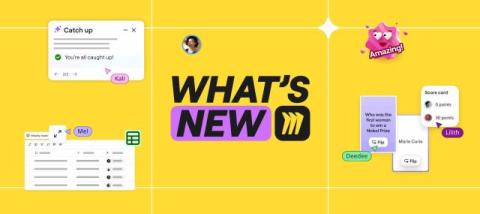

What's New: What we launched in June 2025

Tired of wasting time on formatting, syncing, or tracking changes? Miro’s latest updates cut the clutter so you can focus on solving problems. With smarter diagrams, real-time collaboration, AI-powered catch-up, and seamless cloud and data tools, it’s easier than ever to stay aligned and move work forward—fast. Before we dive in, a quick heads-up: Canvas 25 is back—live in NYC and online on October 14. Don’t miss the latest on AI collaboration and new Miro product drops.

Accelerate your AWS Well-Architected Framework Reviews (WAFR) with Miro

Accelerate your AWS Well-Architected Framework Reviews (WAFR) with Miro, the 2023 AWS Partner of the Year. Instead of juggling PowerPoint, Jira, and AWS Console, Miro gives you a single, collaborative workspace designed to streamline every step of your cloud adoption process..

6 Ways to UNLOCK your Diagramming Workflow

Want to get the most out of diagramming in Miro? In this video, we’ll walk through 6 powerful features that will supercharge your technical diagramming workflow—whether you're building flowcharts, network diagrams, or system maps. Learn how to: Perfect for designers, engineers, and product teams looking to bring clarity to complex systems.

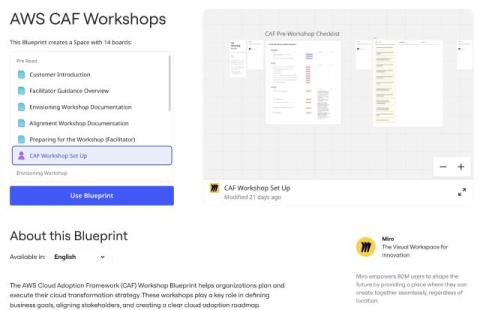
Miro for AWS Cloud Adoption Framework (CAF) Workshops

Miro’s AWS CAF Workshop Blueprint helps organizations plan and execute their cloud transformation strategy. These workshops play a key role in defining business goals, aligning stakeholders, and creating a clear cloud adoption roadmap – following AWS best practices. This Miro Blueprint offers a structured, organized approach for setting up and running AWS CAF workshops, minimizing preparation time while allowing focus on meaningful discussions about cloud adoption. You can use it to.

How to Add Links in Miro - Boost Board Interactivity!

Make your Miro boards interactive with links! This tutorial shows you how to add, edit, and navigate links on objects, text, and frames with ease. What you'll learn in this video: Supercharge your Miro boards and enhance collaboration with these quick linking tips. Watch now and transform your boards! Found this helpful? Like, comment, and subscribe for more Miro tips in under a minute!

How Miro helps organizations consolidate to great

In the last decade, global SaaS revenues have increased by a massive 10x, with employees in large organizations now enjoying access to an average of 112 apps. So enterprise IT is booming, right? Maybe not. Teams are drowning in a swirl of disconnected and disparate tools. Take visual collaboration. Sure, there are lots of options, but they don’t always cater to the functionality needed by different user groups.

Visualize Information with a Mind Map in Miro

Mind maps are a powerful way to organize your thoughts, explore new ideas, and bring clarity to your brainstorming process. In this video, see how we use Miro to create a mind map for a marketing campaign—step by step. You’ll learn how to: Whether you're planning a project, launching a new feature, or mapping out your next big idea—mind maps in Miro make it visual, fast, and collaborative.

How I Do Collaborative Testing in Miro - Tips and Best Practices

Cristina, a member of Miro’s product team, shares how her team uses Miro for collaborative testing to improve product development workflows. She walks you through their process step by step, from setting up clear testing instructions and outlining user journeys to leveraging Miro’s frames, grids, and sticky notes for real-time collaboration. Cristina shows how Miro’s flexible canvas enables teams to test unexpected paths, capture insights, and keep everyone aligned, even in chaotic sessions!

How to Vote in Miro Quick Guide

Struggling to make decisions as a team? Miro’s Voting Tool simplifies decision-making during brainstorming sessions, workshops, or team meetings. Learn how to set up, run, and use the voting tool in this quick tutorial. What you'll learn in this video: Collaborate smarter with Miro’s Voting Tool. Watch now and make team decisions faster than ever! Found this video helpful? Like, comment, and subscribe for more Miro tips in under a minute!

How to Make Meetings Fun With Flip Cards

In this video, Sophia explores Miro’s new Flip Cards widget—a fun and interactive way to reveal content, run engaging sessions, and make your boards more dynamic. Whether you're leading a workshop, designing a game, or just want to add a bit of flair to your board, Flip Cards bring a playful twist to your workflow. You'll learn how to: Try Flip Cards in your next Miro board and don’t forget to like, comment, and subscribe for more Miro tips!

How to Use Comments in Miro - Collaborate Like a Pro!

Make your Miro boards interactive with comments! In this quick tutorial, learn how to use comments for real-time collaboration and feedback. What you'll learn in this video: How to add, edit, and organize comments in Miro. Take your collaboration to the next level with comments in Miro. Watch now and start engaging with your team like never before! Found this helpful? Like, comment, and subscribe for more Miro tips in under a minute!

How To Write Docs SUPER Fast With Miro AI

Drafting documents has never been easier! With Miro AI, you can generate professional docs like Product Briefs, Retrospective Summaries, and Meeting Notes in seconds. What you'll learn in this video: Save time and elevate your workflow with Miro AI. Watch now and see how it works! Like this video? Give it a thumbs up, comment, and subscribe for more Miro tips in under a minute!

Prototyping with AI in Miro: Fast, Smart, and Easy!

Bring ideas to life faster with Miro Prototyping—no design tools or dev work required. In this 2-minute walkthrough, Rosalba Giuffrida, Group Product Manager at Miro, shows how she turns static screenshots into testable, interactive prototypes using AI. Whether you're working on websites, apps, or early product concepts, Miro Prototyping makes it easy to: Built for product managers, designers, and cross-functional teams working fast and iterating early. Give it a try — Miro Prototyping is free during Beta.

How I Use Miro to Create Powerful Integrated Campaign Flows

In this video, Brandon, a Paid Media Lead at Miro, walks you through how he uses Miro's innovation workspace to build integrated marketing campaign flows. You’ll get a behind-the-scenes look at how to map out each stage of a campaign, create clear visual models that communicate strategy, and leverage Miro's diagramming tools to make your campaigns more effective.

New Templates in Miroverse - May 2025

As summer approaches, Miroverse Creators show no signs of slowing down. Nearly 100 new templates were added in May alone! From agility workshops to tarot retrospectives, the range of frameworks continues to impress. We’re constantly inspired by your creativity, and can’t wait to see what fresh ideas the coming months will bring.

Miro Joins Forces with XPRIZE to Build the Future

Miro is partnering with XPRIZE to support the world's most forward-thinking innovators. As part of this collaboration, all XPRIZE teams now have free access to Miro’s visual collaboration platform, helping them accelerate their work, solve complex global challenges, and turn ideas into real-world impact faster. From climate change to space exploration, XPRIZE teams are tackling massive problems with bold solutions. Miro gives them the tools to brainstorm, prototype, and collaborate seamlessly across disciplines and borders.