Teams | Collaboration | Customer Service | Project Management

Turn Messy Feedback into Structured Insights Instantly | Miro Flows Tutorial

Stop spending hours organizing scattered product feedback. In this video, Damir, a Product Leader at Miro, shows you how to use Miro Flows to instantly synthesize unstructured feedback into clean, structured insights. Watch as Damir builds a flow from scratch that takes feedback from multiple sources such as sticky notes, customer feature requests, user interview transcripts, UXR reports, and even Slack screenshots, and transforms it all into a structured table complete with.

How to Convert Physical Sticky Notes to Digital in Miro

Your team just wrapped up a brainstorm or retro with sticky notes covering every inch of the wall. Now what? Instead of transcribing each one by hand, or worse, losing those insights entirely, you can snap a photo and let Miro AI do the rest. This tutorial shows you how to digitize physical sticky notes in seconds. Upload a photo to your Miro board, and the AI Sidekick converts handwriting to text, preserves colors, and maintains the original layout. No manual work, no lost ideas.

How to Design a Network Diagram in Miro | Updated 2026

Whether you're mapping out cloud infrastructure, planning a game server architecture, or documenting your company's network topology, Miro makes it easy to build clear, professional network diagrams your whole team can collaborate on. This tutorial walks through two approaches: building a diagram from scratch using Miro's extensive shape libraries (AWS, Azure, Cisco, Google Cloud, Kubernetes, and more) or starting with a pre-built template and customizing it to fit your project.

How to Make a Bar Chart in Miro | Step-by-Step Guide

Bar charts are one of the clearest ways to compare data across categories or time periods—and in Miro, you can build one in minutes while keeping your team in the loop. This tutorial covers everything from adding a bar chart to your board (vertical or horizontal) to customizing it with real data. We use a practical example comparing API response times across two years, showing how side-by-side bars make performance trends immediately visible.

Create Pie Charts in Miro in Under 2 Minutes | Quick Tutorial

Need to present data that stakeholders actually understand? Pie charts are one of the fastest ways to make numbers visual and meaningful—and creating one in Miro takes less than two minutes. In this tutorial, we walk through the entire process from start to finish: adding a pie chart to your board, entering your data, customizing the look, and exporting it for presentations or reports. We also cover a practical example using server resource allocation so you can see exactly how it works with real data.

Forrester names Miro in Strategic Portfolio Management Tools Landscape Report

Miro has been included among the notable vendors in Forrester’s Strategic Portfolio Management Tools Landscape, Q4 2025 report.¹ According to the Forrester report, Strategic Portfolio Management (SPM) tools are “technologies that automate the translation of enterprise strategic plans into product and service plans that deliver business value through the prioritization and delivery of work initiatives.” The report explains that tech leaders and strategic value office (SVO) leaders u

Miro Facilitation Tools Tutorial: Run Workshops Like a Pro

Learn how to use Miro's collaboration and facilitation tools to run more productive workshops and meetings. This tutorial covers four essential features: Bring Everyone to Me, Timer, Voting, and Reactions. In this video, you'll learn how to: Whether you're running a product planning session, design sprint, or team brainstorm, these Miro features help you facilitate like a pro.

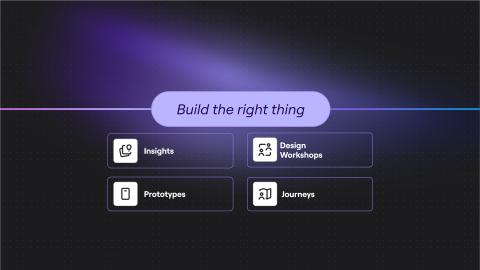
A new way for product teams to discover and build the right things

As AI compresses time from idea to release, any team can build quickly — but are your teams just moving faster in the wrong direction? Every week you spend building something customers don’t want is a week your competitors could be capturing market share.
 The pressure isn’t just to move fast — it’s to be right.

Connecting strategy to execution: How product leaders close the gap

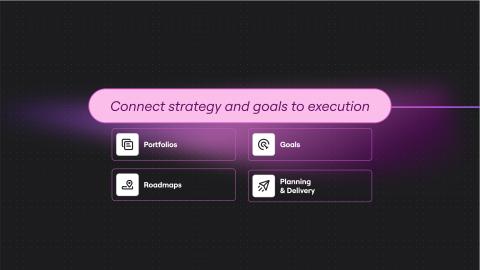
Good strategy doesn’t guarantee good results, especially when you can’t see how the work connects. Product leaders set the product vision, but then struggle to turn that vision into reality, and many tell us what keeps them up at night is not knowing if their teams are focused on the right business priorities. Teams, meanwhile, inherit fragments. Once work begins, context dilutes quickly.

How to Create PlantUML Diagrams in Miro - Full Tutorial 2025

PlantUML lets you skip the drag-and-drop and create diagrams directly from code. In this video, I'll show you how to set up the PlantUML integration in Miro, write a quick microservices authentication flow, and add the diagram to your board so your team can collaborate on it. No more switching between documentation tools and your collaboration platform, everything lives in one place. Subscribe for more Miro tutorials and tips!

The Miro Recap: Top 25 updates of 2025

2025 delivered. Big time. This was the year Miro became the AI Innovation Workspace, where you and your team can work together with AI on one shared canvas. We also celebrated a huge milestone: more than 100 million users worldwide, with 250,000+ companies building on Miro. There’s a lot to cover — from AI that actually gets what you’re working on, to new ways to structure your work, and integrations that keep all your go-to tools in sync.

AI prototyping for alignment: The product team's shortcut to "yes, we're building the right thing"

Every product team knows the feeling: You’ve built something technically impressive. The code is clean. The design is polished. The only problem? Nobody wants it. Just 6% of product features generate 80% of click volume on average. That means the vast majority of what teams build — despite months of effort, countless meetings, and significant investment — ends up as digital dust. Teams are building faster than ever before.

Taking AI from silos to systems: How product leaders are transforming work

AI has become part of how product teams think, plan, and create. But too often, these experiments happen in isolation — outside the tools and rituals where work actually gets done. The result is acceleration that looks promising in one corner of the organization but stalls when it needs to scale.

How to Customize a Miro Sidekick for Your Team

Learn how to customize Miro Sidekicks to fit your team's specific workflow, company guidelines, and documentation. This tutorial covers cloning existing Sidekicks, editing their instructions to match your process, and uploading your own knowledge sources like strategy docs, methodologies, and templates. Once customized, you can share your Sidekick with teammates or publish it to the Miroverse.

How to Make Graphs in Miro

There are two ways to create graphs in Miro. You can build them from scratch using the Charts option in your left toolbar, or grab a template from the library and customize it to fit your needs. The template library has everything - pie charts for budget splits, bar charts for comparing metrics, Venn diagrams for showing overlaps, comparison charts for evaluating options, and graphic organizers for mapping out processes. Just search for what you need and start editing.

Miro Prototypes: Turn ideas into collaborative prototypes in minutes

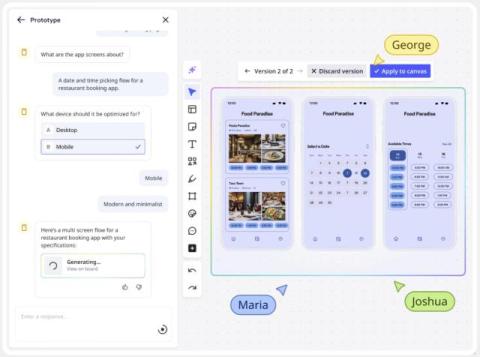
Your team’s ideas already start in Miro and now you can turn them into editable prototypes in minutes. Use the context already on your board to generate, refine, and iterate on concepts together. Drop in a screenshot, explore new directions with AI, or evolve existing flows without starting from scratch. Click through your ideas, gather feedback early, and make confident decisions before moving to design or code.