OneDesk
Helpdesk, Project and Task Management, Product Management, Ideas Management, Release Roadmaps, etc. are all included in OneDesk.


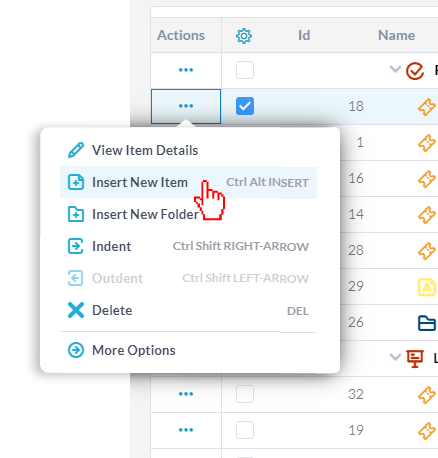
OneDesk allows you to create items such as tickets and tasks by adding them manually. Usually, you will need to fill out the internal creation form for that given item. However, inserting an item allows you to bypass filling out the form and to insert items with the inline item insertion function. This function lets you add multiple items into a given location quickly by providing the minimum amount of information needed, usually just an item name. You can use inline inserting to add any item types.
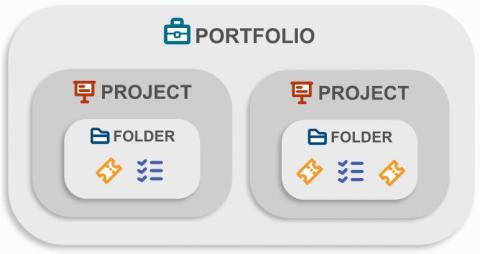
OneDesk uses different naming conventions to refer to the things inside of OneDesk. There are a few main objects that OneDesk can contain: portfolios, folders, projects, and items. However, you can ONLY share projects and items, not portfolios and folders. Portfolios and folders create structure. Portfolios group projects while folders group items. Projects group folders and items together.
A lot of companies, and their underlying departments, face growing pains as they build on their success and establish themselves as true organizations. As product offerings and capabilities expand, departments and teams start to field wider ranges of requests for work, and this can lead to people specializing in order to build efficiency. Sometimes these requests can come from other teams at the same company even.
When a company first starts out, the team is often cross-functional in its nature. This overlapping of responsibilities allows a company to be scrappy and grow quickly without too much overhead. Over time and through this period of growth, companies start to expand and develop more definition in terms of its different internal functions: sales, marketing, customer experience, operations, finances, and more.
On Saturday Feb 27th, OneDesk released the February 2021 update to OneDesk with many new features and improvements.
ERP – or enterprise resource planning – is a term thrown around fairly often when discussing the operations of a business. The focus of ERP is to improve efficiency by seeking insight into where resources are allocated and improving how they are being utilized. To develop a full picture of where resourcing is currently, analysis and planning needs to be done across verticals – from finance to human resources, from distribution to procurement.
Subtasks are an item in OneDesk that represents the break-down of complicated tasks into smaller ones. They act similar to any other item and have the same functionality. When you create a subtask, you are creating a regular item. This means that you can unlink it, delete it, assign it separately, move it to another project, or update its status.