

Teams | Collaboration | Customer Service | Project Management

Employee Feedback: 10 Statistics That Explain Why Timing Matters

An employee sends over a piece of work they care about. They check their messages, wondering what their manager thinks. A day passes. Then a week. The next assignment arrives, but the feedback never does. At first, they wonder whether the work was good enough. Eventually, they stop asking. They still finish their tasks, but become less willing to suggest improvements or volunteer for something difficult. Extra effort starts to feel like sending a message nobody reads.

How Team Communication Improves Long-Form Content Creation

Creating high-quality long-form content takes more than strong writing skills. Blog articles, industry guides, reports, and thought-leadership pieces often require research, subject-matter expertise, editing, fact-checking, and approval from multiple people. When these activities happen in separate conversations and disconnected tools, content teams can lose time, overlook feedback, and struggle to maintain consistency.

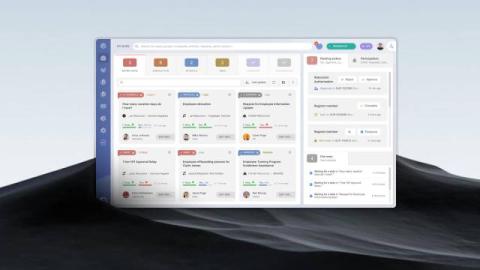
Azure DevOps Ticketing System: How to Turn Support Tickets into Work Items

Azure DevOps is often considered for ticket management because it gives teams a way to record issues, assign work, and track progress. The question for IT organizations is how well it supports service requests and incidents, particularly when resolving an issue requires work from a development team. The core purpose of Azure DevOps is managing software development, even though it can track support-related work.

Free Work Hour Trackers: 6 Tools That Are Actually Free

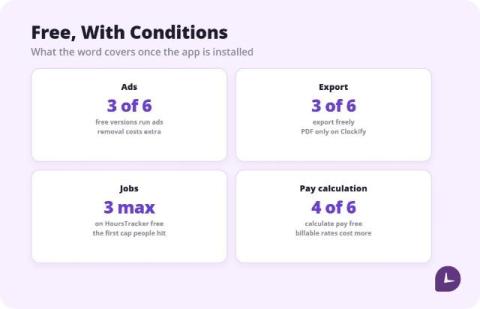
Six free hour trackers, compared from vendor pricing pages and current store listings. The honest summary: several are free because they show ads, most lock pay calculation or export behind a paid tier, and for one person a one-time unlock often beats a subscription within a few months. Pick by which limit you can live with, not by the word free.

How to Keep Track of Work Hours: 6 Methods Compared

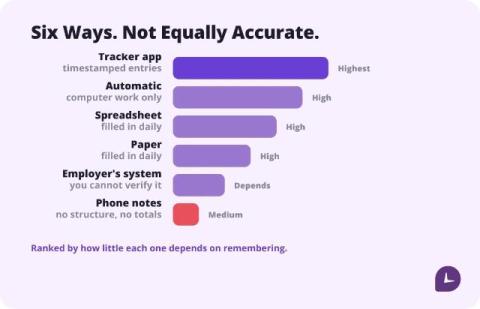
The most accurate way to keep track of work hours is to record start and end times the moment they happen, in whatever tool you will actually open. A dedicated hour tracker app loses the fewest minutes; a spreadsheet filled in daily is close behind; reconstructing the week on Friday is the least accurate method and the most common one. Pick by what you will do every day, not by feature count.

Product Discovery Tool Checklist: 10 Questions to Ask Before You Buy

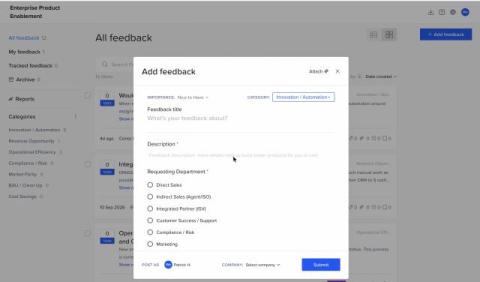
Most product discovery tools look the same in a demo. Each one has an inbox for ideas, a scoring screen and a roadmap view. The differences show up three months later, when feedback is scattered, scores have drifted away from strategy, and engineers are re-typing items into Jira. This checklist is for the product manager who already feels that pain and the Head of Product or VP Product who has to approve the purchase. Use it on any vendor, including craft.io.

Coworking Statistics: How Companies and Employees Use Shared Workspaces

You leave the house because you need a quiet place to work. An hour later, you’re in a shared workspace, wearing headphones while someone nearby explains their quarterly targets on a video call. Then, over coffee, a conversation with another member helps you solve something you’ve been stuck on all week. Both experiences can happen in the same place.

Employee Turnover Statistics: Why Employees Leave and What Makes Them Stay

A team can look stable on paper while its employees are quietly considering their next move. People attend meetings, meet deadlines, and keep projects running. What the headcount report cannot show is whether they still see a future with the company. That’s why employee turnover statistics need context. Resignations tell employers who has already left. Engagement surveys, job-search intentions, and employee experience research can reveal what’s happening among the people who are still there.

How to Choose an Employee Productivity App

An employee productivity app tracks work time, app and website use, and idle time on work computers. Before choosing one, compare what employees can see, what managers can track, and which devices the app supports. This article compares what employees and managers can each see in Flowace, whether it runs on your team’s computers, and how to calculate what idle time is actually costing you. TL;DR.