Teams | Collaboration | Customer Service | Project Management

The latest News and Information on Project Management, Methodologies, Productivity and Tools.

OneDesk - Getting Started: Sharing with Users & Teams

OneDesk lets you share projects with your users and teams and assign roles at the team level. OneDesk combines Help Desk & Project Management software into a single application. OneDesk also includes customer-facing applications: real-time chat, customizable webforms, and a customer portal. These integrated applications allow you to serve your customers while conveniently working on your projects in one platform.

OneDesk - Getting Started: Item Creation & Configuration

OneDesk allows you to enable and configure multiple item types. They can have different icons, colors, lifecycle statuses, and creation emails. Create and add custom fields to the ticket or task’s individual creation forms. OneDesk combines Help Desk & Project Management software into a single application. OneDesk also includes customer-facing applications: real-time chat, customizable webforms, and a customer portal. These integrated applications allow you to serve your customers while conveniently working on your projects in one platform.

OneDesk - Getting Started: Live Chat Support

OneDesk includes live chat support, allowing you to support your customers in real-time. Your customers can ask questions and include attachments when messaging you. OneDesk combines Help Desk & Project Management software into a single application. OneDesk also includes customer-facing applications: real-time chat, customizable webforms, and a customer portal. These integrated applications allow you to serve your customers while conveniently working on your projects in one platform.

OneDesk - Getting Started: Subtasks

OneDesk lets you divide complex tickets and tasks into smaller, manageable subtasks. The created subtasks can be assigned individually and managed independently. OneDesk combines Help Desk & Project Management software into a single application. OneDesk also includes customer-facing applications: real-time chat, customizable webforms, and a customer portal. These integrated applications allow you to serve your customers while conveniently working on your projects in one platform.

Asana Focus & Flow Summit featuring Adam Grant

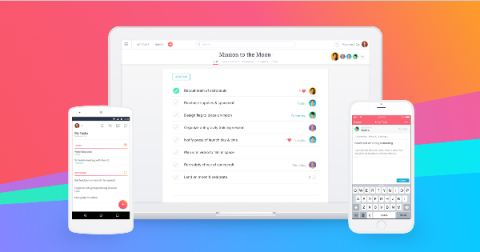
In a distracted world, finding focus and flow is essential. The Focus & Flow Summit brings together today's leading thinkers on mindset, habits, purpose, and productivity. Plus, Asana's Head of Product Marketing demoes Asana's newest product features designed to align your attention with your intention so you can focus on the work that matters.

8 Best Contact Center Software for 2021

For any company, its customer service is a major driving force behind its growth. And with the right contact center software, you can improve the customer experience while making your support team’s job easier. You’ll be able to resolve queries and reach out to potential customers across multiple channels with ease. But with a wide variety of contact center software available today, which one should you go for?

Less distraction, more focus: Introducing new features designed to help you align attention with intention

Knowledge workers today are more distributed than ever. They’re also more distracted. In fact, 80% of employees work with their inbox and communication apps open, leading to nearly 75% feeling pressured to multitask during the day according to the Anatomy of Work Index. The result? Lower efficiency, overlooked messages, and missed deadlines.