Teams | Collaboration | Customer Service | Project Management

Your guide to smarter AI resource management

Managing people, time, and tasks can be a lot to handle—especially when things move fast and priorities keep changing. I used to rely on spreadsheets, emails, and guesswork to keep everything on track. But it didn’t always work. That’s when I started looking into AI resource management, and it’s made a big difference to how I manage projects. It helps me plan better, assign tasks faster, and see who’s busy or available in real time.

5 steps to get started with self-service - Step 5: Optimize your help center and plan maintenance

On August 12, the Zendesk team hosted the last delivery of our series 5 steps to get started with self-service - Step 5: Optimize your help center and plan ongoing maintenance. Join us in this Zendesk session, to watch our experts Patty and David guide attendees through advanced strategies for optimizing and maintaining a Help Center as part of a broader self-service series. The focus was on enhancing knowledge base articles with multimedia, managing content efficiently using article lists and context panels, and leveraging enterprise features like team publishing and article verification.

Why Customer Service Ratings and Reviews Matter

Feedback matters in the customer-centric era of business we work in. Whether it’s a customer telling your CEO that an agent did a great job or giving them a “negative” face after a chat session, there are many ways companies can receive feedback about their business. One method that has increased in popularity over the years is ratings on third-party sites like G2 and Capterra.

Automation Tools for Customer Support: A Guide for B2B Teams

Today’s B2B support teams are under increasing pressure to meet rising customer expectations while working with flat budgets and limited headcount. Customers now expect faster response times, seamless interactions across channels, and proactive communication. Meeting those demands without expanding headcount can feel impossible. That’s where automation comes in. Customer support automation reduces repetitive tasks, accelerates resolution times, and ensures consistent, high-quality experiences.

See What Miro AI Can Do in Seconds!

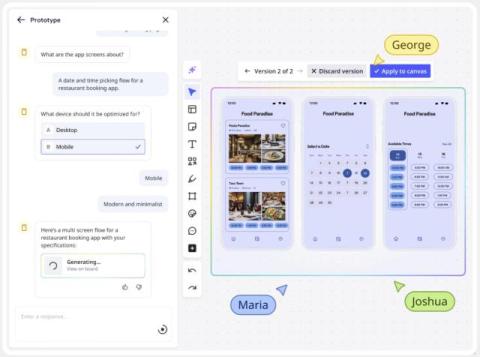
Learn how to supercharge your workflow with Miro AI in this comprehensive tutorial! Discover how to generate documents, images, sticky notes, tables, diagrams, and prototypes using AI prompts. We'll show you advanced techniques like incorporating board content as context, refining outputs, and using selected objects to trigger smart suggestions. Perfect for teams, designers, and anyone looking to boost productivity with AI-powered collaboration tools. Master Miro's newest AI features and transform how you brainstorm, plan, and create visual content.