
Teams | Collaboration | Customer Service | Project Management

The latest News and Information on Project Management, Methodologies, Productivity and Tools.

Best Time Tracking Software for Consultants in 2026

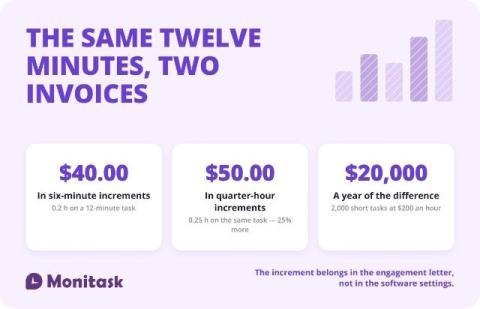
The best time tracking software for consultants records time against a client and a project, separates billable from non-billable hours, and turns approved time into an invoice without re-entry. Beyond those three, the choice depends on how you bill: hourly work needs billing increments, retainers need a running balance, and fixed-fee work needs an effective hourly rate. This guide compares ten tools and then covers the billing decisions the tools leave to you.
OneDesk for Client Services in 1 Minute

OneDesk for B2B and client services OneDesk offers products for Help Desk, Project, an Work Management software all in a single connected application. Capture requests and support from included channels: phone, email, real-time chat, customizable webforms, and a client portal. Track time, manage tasks and projects and even bill for your services without switching context.

OneDesk for Internal Teams in 1 Minute

How OneDesk helps internal teams and departments. OneDesk offers products for Help Desk, Project and Work Management software all in a single connected application. Capture tickets from included channels: email, phone, real-time chat, customizable webforms, and an employee portal. Convert tickets to tasks and manage internal operations and project alongside your daily support.

Job Costing: How to Calculate the True Cost of a Job

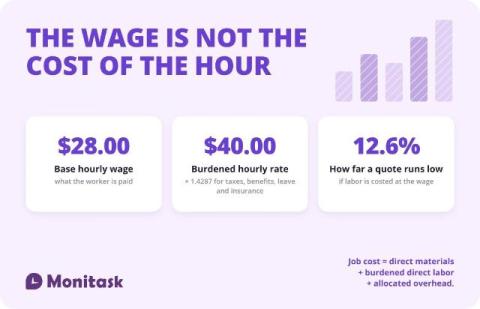
Job costing calculates the total cost of one specific job by adding three figures: direct materials, direct labor at a burdened rate, and an allocated share of overhead. A $28 hourly wage costs roughly $40 once employer benefits are included, so job costs built on base wages run about 12% low. Contractors, agencies, manufacturers and professional services use it to price work and measure margin per job.

What Employee Monitoring Software Actually Tracks (and What It Cannot)

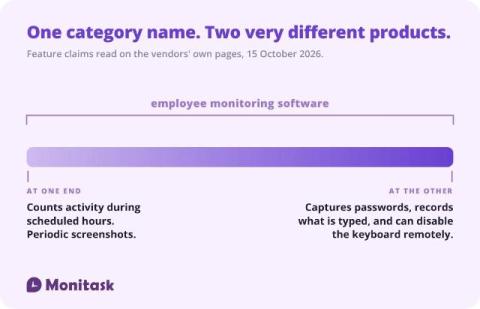
The category name covers two very different products. At one end, software that counts keyboard and mouse activity during scheduled hours and takes periodic screenshots. At the other, software that logs the content of what is typed — including passwords and card numbers — records the screen continuously, and can remotely block an employee’s keyboard. Both are sold as employee monitoring software. Decide which one you are buying before comparing prices.

Open Source Employee Monitoring Software: What You Take On

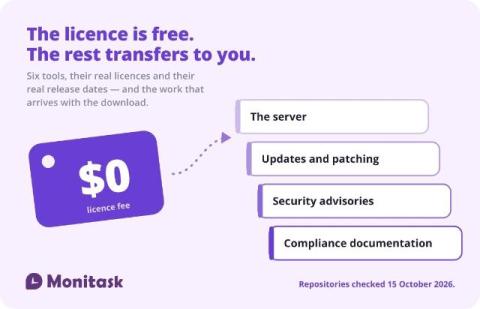
Open source monitoring tools are free to licence and not free to run. The licence question matters more than most guides admit — one popular option is under SSPL, which is not an OSI-approved open source licence, and one widely listed “open source” tool has no licence file at all. Two of the tools that appear on every list are not employee monitoring software in any sense their own authors would recognise.

Is Employee Monitoring Legal? What Employers Can and Cannot Do

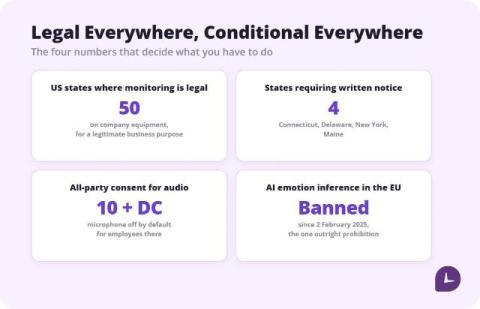
Employee monitoring is legal in all 50 US states and in most other countries, but legality depends on how it is done rather than whether it is done. On company-owned equipment during work hours, with a written policy in place, monitoring is broadly permitted under federal law. Four states require written notice first. Audio recording, biometrics and personal devices each have separate rules, and the EU treats employee consent as unreliable by design.

How to Keep Track of Work Hours: 6 Methods Compared

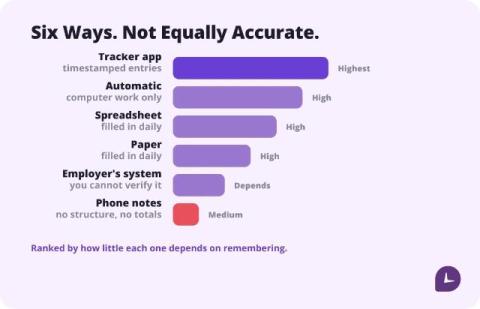
The most accurate way to keep track of work hours is to record start and end times the moment they happen, in whatever tool you will actually open. A dedicated hour tracker app loses the fewest minutes; a spreadsheet filled in daily is close behind; reconstructing the week on Friday is the least accurate method and the most common one. Pick by what you will do every day, not by feature count.

Free Work Hour Trackers: 6 Tools That Are Actually Free

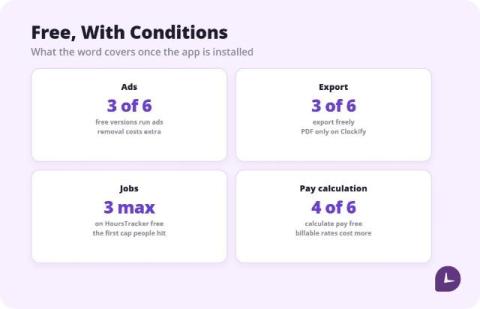
Six free hour trackers, compared from vendor pricing pages and current store listings. The honest summary: several are free because they show ads, most lock pay calculation or export behind a paid tier, and for one person a one-time unlock often beats a subscription within a few months. Pick by which limit you can live with, not by the word free.

How to Prioritize Support Tickets

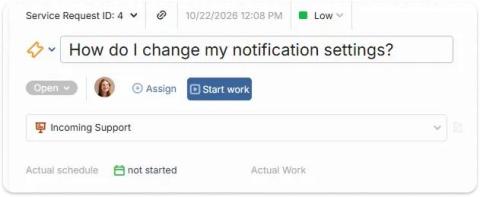
First-in, first-out queues feel fair, but they let a password reset sit ahead of an outage. Going off gut feeling works until the team or queue grows too much. An impact × urgency matrix gives everyone the same rules, takes seconds to apply, and is simple enough to automate. This guide covers how to define each axis, the matrix itself, worked examples, and a step-by-step process you can adopt this week.