
Teams | Collaboration | Customer Service | Project Management

Contractor Time Tracking: What to Track and What It Means

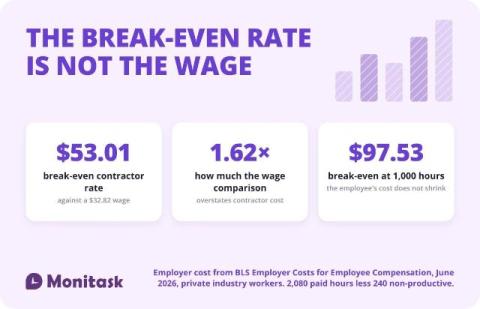
Contractor time tracking records hours against work rather than against a schedule. The distinction matters beyond bookkeeping: the IRS asks whether a business controls “or has the right to control what the worker does and how the worker does his or her job,” so a system that sets a contractor’s hours is itself a factor. And the rate at which a contractor stops being cheaper than an employee is $53.01, not the $32.82 an employee earns. > This is not legal or tax advice.
Paid Hours Vs Billed Hours: Where BPO Margin Quietly Leaks

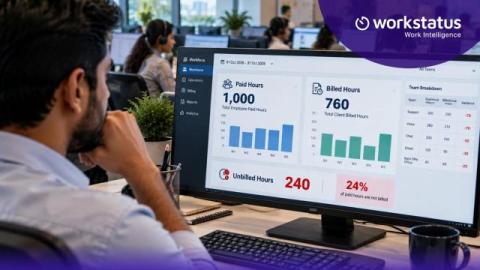
Say an agent works a 9-hour shift. You pay for all 9 hours. But you can bill the client for only 7. Those 2 hours are a cost you never get back. Now picture that across every agent and every shift. That’s where BPO margin quietly leaks. Most teams don’t spot it until month-end, when the numbers don’t add up. It doesn’t have to stay hidden. With Workstatus, you can match each paid shift to the right client account as the work happens.

How to Use Rovo with GitHub: 5 AI Workflows for Pull Requests and Releases

Rovo connects GitHub to Jira and Confluence through the Teamwork Graph, so you can ask it which pull requests to review first, what's blocking a release, what shipped this week, and which pull requests are ready to merge. In this video, you'll see five ways engineering teams use Rovo with GitHub to cut context-switching and find answers that would normally mean checking every repository, Jira board, and release doc.

How to monitor employees working from home (without losing their trust)

November 2, 2026 Quick overview: To monitor employees working from home without losing their trust, set expectations and capture only the data each role needs. Then let employees see the same data you do. Time Doctor, used by 10,000+ distributed teams, shows the time, tasks, and tools behind each workday as it happens. This guide covers six steps: expectations, what to capture, one live view, results, check-ins, and well-being.

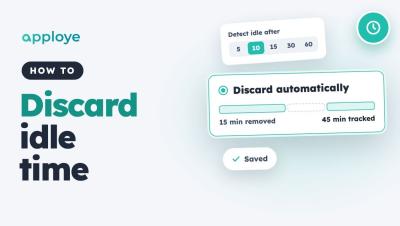
How to Discard Idle Time Automatically in Apploye

Learn how to discard idle time automatically in Apploye, so idle minutes come off tracked time without anyone having to review them. Go to Settings → Activity → Idle time, choose when time counts as idle, and pick Discard automatically. You can also give individual members their own idle settings.

GPS Time Clock for Employees: Accuracy, Geofencing, and the Law

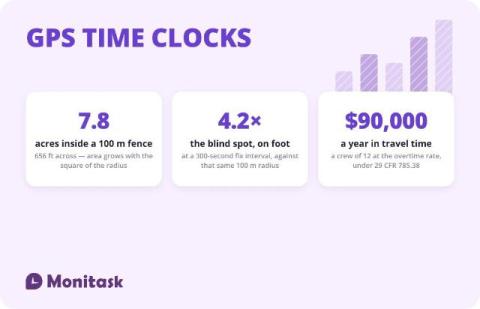
A GPS time clock records a location alongside each clock-in and clock-out, so a timesheet carries where the work started as well as when. It answers the attendance question for field crews that a desk time clock cannot. It does not provide continuous proof of presence: the accuracy figures in circulation measure the satellite signal rather than a phone, and a geofence confirms position at the moment of a fix rather than detecting the moment someone leaves. > This is not legal advice.

The 10 best AI agents for business in 2026, by use case

This comparison is written by Asana, and Asana AI Teammates are assessed against the same criteria as every other tool. Your ops lead wants an AI agent that can triage incoming requests, but your marketing team needs a tool that can draft a campaign brief from a single prompt. Your IT, HR, engineering, and project management office (PMO) teams all need agents that assist or autonomously complete tasks, too.

Claude + Miro: Automatically Visualize Changes in Your Repo

Want to keep your system architecture diagrams up to date without manually documenting every code change? In this tutorial, we'll show you how to use Claude scheduled tasks and Miro to automatically visualize changes to your GitHub repository. Learn how to set up a scheduled task that checks your repository for new pull requests, generates updated system architecture diagrams, and visualizes exactly what's been added or removed. You'll also see how Miro makes it easy to compare architecture snapshots, track changes with timestamps, and review proposed updates with your team.